> ## Documentation Index
> Fetch the complete documentation index at: https://docs.configu.com/llms.txt
> Use this file to discover all available pages before exploring further.
# Trigger Github Actions using a Configu Webhook
> Learn how to trigger a [GitHub workflow](https://docs.github.com/en/actions/using-workflows/triggering-a-workflow) from a webhook invocation.
## Prerequisites
* Access permissions to create a WebHook for Github Actions.
* Configu Cloud organization with admin permissions (if you donn't have an account, get one free [here](https://app.configu.com))
## Create a Configu Webhook
1. Define your target workflow payload URL: `https://api.github.com/repos/{owner}/{repo}/actions/workflows/{action-id}/dispatches`, example:
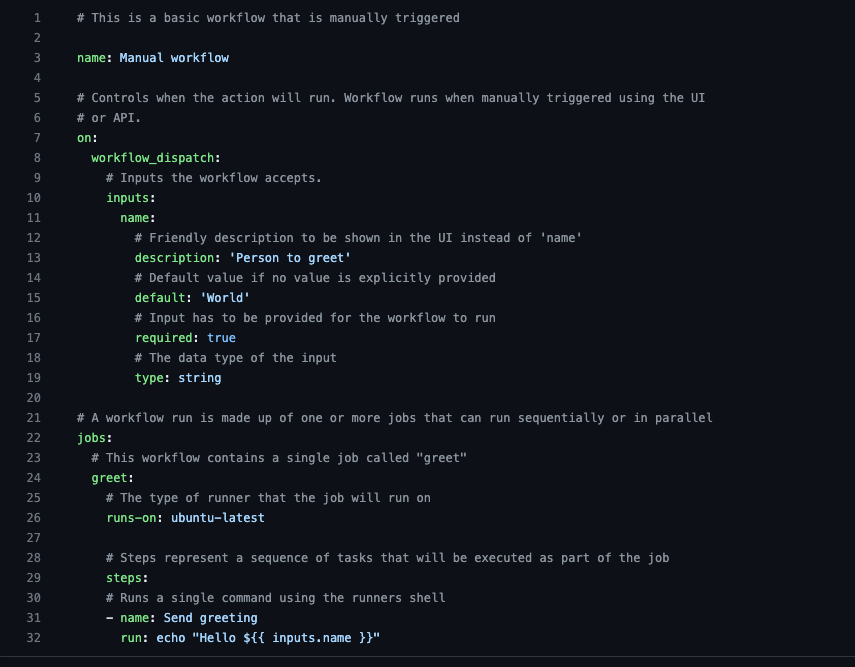 2. Customize your header to include an `Authorization` header with your GitHub personal access token. Example:
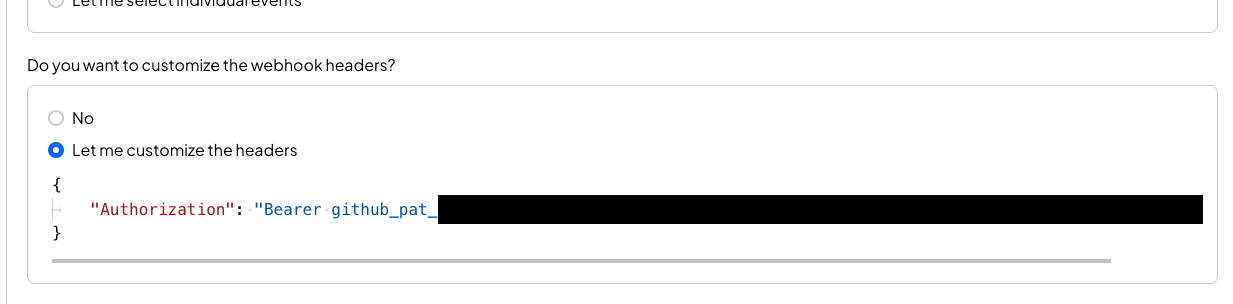 3. Customize your payload to contain the data you need, for this example:
you will need to send the following payload data:
3. Customize your payload to contain the data you need, for this example:
you will need to send the following payload data:
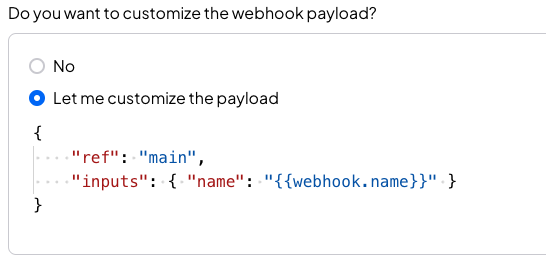 * `ref` is the branch that contains the workflow definition
* `inputs` is the data that the workflow will use that is sent from the webhook
* `ref` is the branch that contains the workflow definition
* `inputs` is the data that the workflow will use that is sent from the webhook